

ClearURLs: clean tracking links and repair broken URLs
Clean known tracking parameters, keep original links and use the global pause carefully when a site breaks.
Get extensionUse ClearURLs in Firefox when you want known tracking parameters removed from links as you browse or copy them. I'd choose it for that focused job, provided you're comfortable with a global pause switch: it doesn't offer a normal per-site whitelist. The current release still uses Manifest V2, so an old Chrome installation guide won't make it compatible with modern Chrome.
A shorter address is useful only if it still opens the right page. Keep the original link until you've checked the cleaned destination, especially for sign-in links, shopping filters and shared documents.
Start with the official Firefox extension
Use a current Firefox release; ClearURLs 1.28.0 requires Firefox 98 or later. Install ClearURLs by Kevin from Firefox Add-ons. The listing also supports Firefox for Android. ClearURLs is free and open source; you don't need a ClearURLs account to clean links.
Before accepting the installation, read the permissions. The add-on can access data on all websites, browser tabs and navigation activity. Its downloads permission supports exporting logs and settings. These are broad capabilities, even though the developer says it doesn't collect browsing or usage data.
For Chrome, stop at the compatibility check. ClearURLs 1.28.0 remains a Manifest V2 extension; Chrome's Manifest V2 retirement prevents it from running in Chrome 139 and later. The ClearURLs documentation says its Manifest V3 migration isn't finished and warns that other Chromium browsers can disable the add-on. Don't assume a similarly named store result is the same product, or weaken your browser setup to follow a 2021 sideloading tutorial.
Once installed, ClearURLs cleans matching URLs in the background. Open its toolbar popup to reach Configs, the settings gear, the log and the crossed wrench-and-screwdriver Cleaning Tool.
Choose automatic cleaning, a clean copy or a batch
ClearURLs works from maintained rules, rather than deleting everything after a question mark. Query fields can carry a search, a page number or a document's access token. Removing all of them by hand can change the destination or stop it opening.
| What you need | Use this route | Check the result |
|---|---|---|
| Clean addresses while browsing | Leave Configs > Filter enabled | The page and its required controls still work |
| Share a link without opening its target | Right-click the link > Copy Clean Link Location | Paste it somewhere private and inspect the address before sending |
| Inspect one address or clean several | Open the Cleaning Tool, paste one URL per line, then select Clean URLs | Compare the output with the originals before replacing saved links |
If Copy Clean Link Location is missing, open the gear settings and check Display context menu entry. The command applies to a link on the page. The Cleaning Tool is the clearer route when you already have addresses in a message or text file.
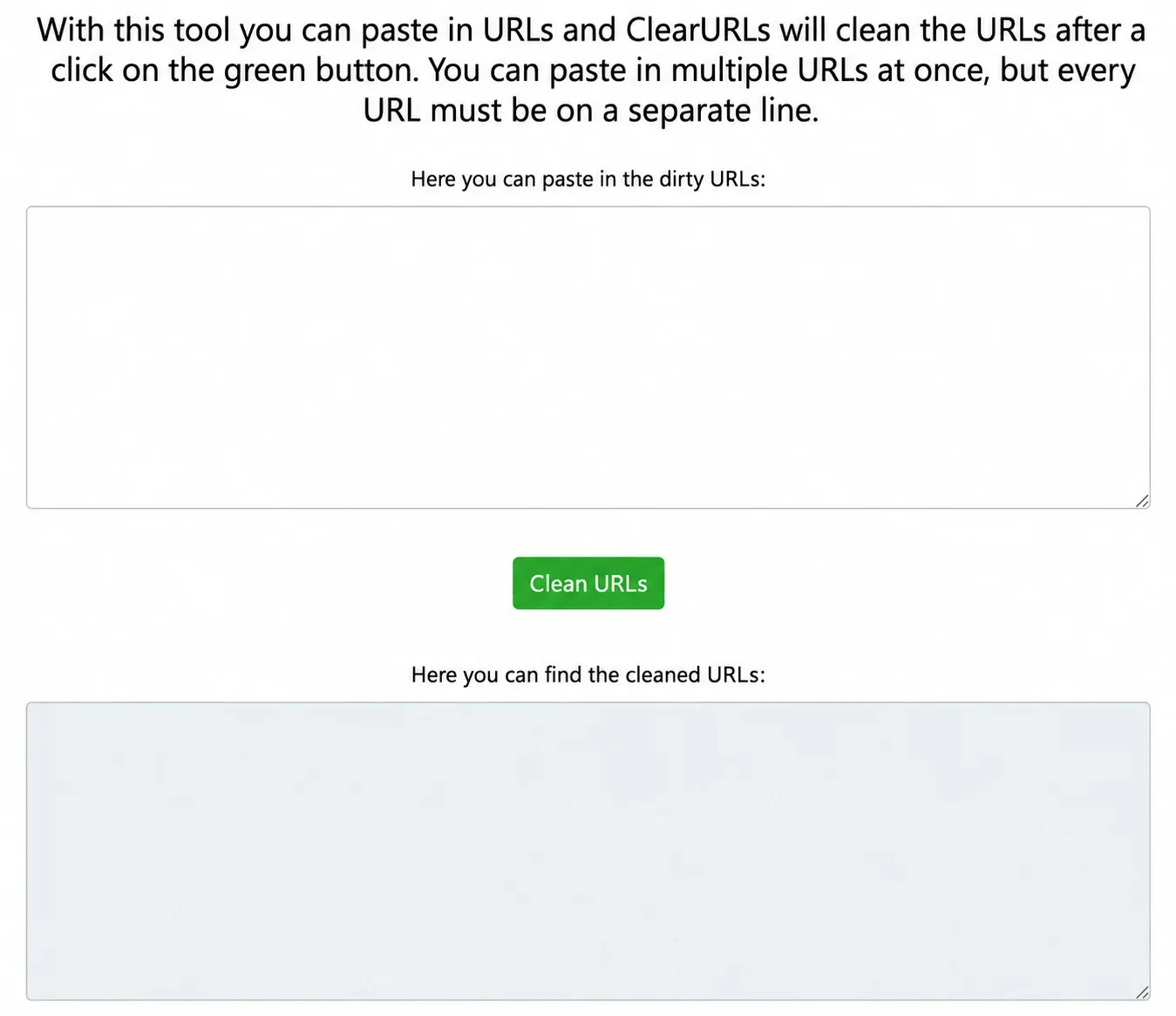
In the Cleaning Tool, put the original addresses in the upper box. Select Clean URLs; the lower box receives the cleaned addresses. Copy the output you need, while retaining the originals until the links have been checked. The Cleaning Tool lets you inspect changes without visiting the website.
For a basic functional check in your own Firefox setup, open the project's ClearURLs test page with JavaScript enabled and follow its status indicators. A successful check covers that page's cases. It doesn't establish that every tracking parameter is removed or that every website will remain intact.
Make the referral choice explicitly
Open the settings gear and find Allow referral marketing. Leave it on if you want supported referral or affiliate parameters preserved. Turn it off if you want those fields removed by the matching referral rules as well.
This is worth checking after an upgrade. The 1.28.0 release notes changed the default to allow referral marketing when no preference has been saved, including after an upgrade. An existing saved preference takes precedence. Older descriptions that say referral marketing is blocked by default don't describe this new default.
I'd make that choice deliberately rather than infer it from a link looking shorter. The setting controls the catalog's referral-marketing rules; it doesn't promise that every remaining field is essential or that every affiliate arrangement is recognized.
The rule catalog updates separately from the extension package. If a particular address is mishandled, open the gear settings and select Save & reload addon to refresh the rules, as described in the ClearURLs troubleshooting instructions. Keep the default rule and hash addresses unless you're intentionally taking over rule maintenance. A custom catalog can contain removals, exceptions and redirects, so replacing its source is a trust decision.
If a link or page breaks, pause and reopen the original
Save unfinished work before reloading a page. For a sign-in email or invitation, keep the complete original link private. Don't post it to a bug tracker: its address can contain a one-time access code.
- Open the ClearURLs popup and turn Configs > Filter off. This pauses cleaning globally; it isn't an exception for the current website.
- Reload the affected page. If the failure concerns a link that was already cleaned, reopen the original from its email, message or saved copy after pausing. Reloading the shortened address can't put a deleted parameter back.
- Repeat the failed action once. If a one-time sign-in link has expired, request a fresh one. For a payment, check its status before submitting again.
- Turn Filter back on after the temporary task. Your rules and settings stay in place while it is paused.
When the original works only with cleaning paused, ClearURLs is implicated in that workflow. Update the add-on and rules before making a permanent change. If pausing makes no difference, restore Filter and investigate other blockers, browser settings or the site itself.
There is no released per-website whitelist in the documented interface. A website exception inside a self-hosted rules catalog is an advanced maintenance route, not a normal popup switch. I wouldn't take on a custom catalog just to complete one sign-in.
If navigation inside a web app is the specific failure, the settings include Prevent tracking injection over history API. After confirming ClearURLs is involved, turn off that one feature, select Save & reload addon and retry the app. Restore it if the change doesn't help. It affects protection across sites, so keep the narrower diagnosis separate from the global Filter pause.
Don't treat every old Google Docs, sign-in or redirect report as a current defect. Version 1.28.0 includes fixes for URL encoding, fragments, application navigation state and Google OAuth handling. Start with the current release and a reproducible symptom before disabling a feature.
Use logs briefly and protect the exports
Logging is off by default. To investigate a reproducible failure, turn on Configs > Logging, repeat the action, then open Log. The table records the address before and after cleaning, the rule and a timestamp. Those details can reveal what was removed, but they can also expose private searches, document addresses or sign-in codes.
The official reporting workflow uses Export on the log page to save ClearURLsLogExport.json. Turn Logging off when you've captured the relevant event. Review and redact the file before attaching it to a public report; describe the failed action and the Filter-off comparison without sharing working access tokens.
The settings-page Export produces ClearURLs.conf. It includes settings, statistics and rules, and can include the stored log. Keep it private too. Export a backup before importing settings, because an import overwrites the corresponding saved values. A reset is a poor first response to one broken link.
The ClearURLs privacy policy says the add-on doesn't collect usage data or embed analytics hooks. It still contacts remote hosting to update its rules and hash file. Local logs and counters are separate from telemetry; neither a high blocked count nor a clean-looking URL proves that a site has stopped tracking you.
Keep URL cleaning separate from broader blocking
ClearURLs also has optional common-ad-domain blocking and hyperlink-auditing protection, but its defining job is cleaning known URL tracking fields. It doesn't hide your IP address or make a signed-in account anonymous. I'd keep a working content blocker as the primary tool for ads and tracking requests, then add ClearURLs only when its link handling solves a remaining task.
For that broader filtering job, AdGuard's filters and site exceptions offer a different control model, including a normal website allowlist. Avoid stacking tools simply to raise their counters: when a link breaks, overlapping URL rules make the cause harder to isolate. Choose the missing control through the privacy extension hub, and keep the original link available until its cleaned copy works.
