

SponsorBlock review
A practical SponsorBlock review covering category choices, channel profiles, faulty timestamps and the data behind each skip.
Get extensionSponsorBlock skips submitted sections inside YouTube videos, including sponsor reads and optional categories such as subscription reminders. I'd start with sponsorships, keep the skip notice visible and leave more subjective categories on manual control. Its usefulness depends on community timestamps: an unmarked video can play normally, while a badly timed submission can cut into something you wanted to hear.
What SponsorBlock skips, and what it doesn't
The official project describes a crowdsourced extension and open API. Viewers submit start and end times; the extension checks for matching segments and acts on your category settings. It doesn't need to recognize a new sponsor read as you watch. If nobody has submitted that section, there may be nothing to skip.
A sponsorship read belongs to the video itself. A separate advertisement served before or during playback is a different problem. SponsorBlock doesn't replace a network content blocker such as uBlock Origin, and YouTube Premium doesn't make community timestamp controls redundant. Choose each tool for the interruption it handles.
Use the download links on the official site rather than an extension with a similar name. Browser editions and third-party mobile or TV integrations have different installation and control paths. A desktop browser extension doesn't automatically add SponsorBlock to the stock YouTube phone app. Check the listed port for the device and player you use.
Set up one category before enabling everything
Open a normal YouTube watch page and open SponsorBlock's options from its toolbar popup. Review the category behavior: Auto skip jumps across a known segment; Manual skip leaves the decision to you; Show in seek bar marks it without imposing the same automatic jump. The English controls are recorded in the project's interface strings; a translated edition will use different wording.
My starting choice is automatic skipping for clearly separate sponsor reads and manual control for categories that depend on taste or context. Watch the next transition and check whether the sentence after the jump still makes sense. Enable another category only when you know what it removes. A faster video isn't useful if it omits the explanation you came for.
| Category | What to consider |
|---|---|
| Sponsor | Paid promotion separate from the main content. |
| Unpaid/Self Promotion | A creator's products or unpaid promotion; different from a paid sponsor. |
| Interaction Reminder | Requests to like, subscribe or interact. |
| Preview/Recap | Repeated material; don't assume every introduction is disposable. |
| Tangents/Jokes | Subjective value makes manual control useful. |
| Highlight | A jump to a selected point, rather than a conventional interval to remove. |
The category guidelines matter when the label is ambiguous. Intermission/Intro Animation isn't a catch-all for anything before the main point. A conclusion containing useful information shouldn't become a greeting/outro skip merely because it appears near the end.
Undo a jump before judging the submission
Use Unskip in the skip notice to return to the skipped section. Listen across both boundaries before deciding whether the timing is wrong. If the content belongs to a category you enabled, change your own preference rather than downvoting a valid submission.
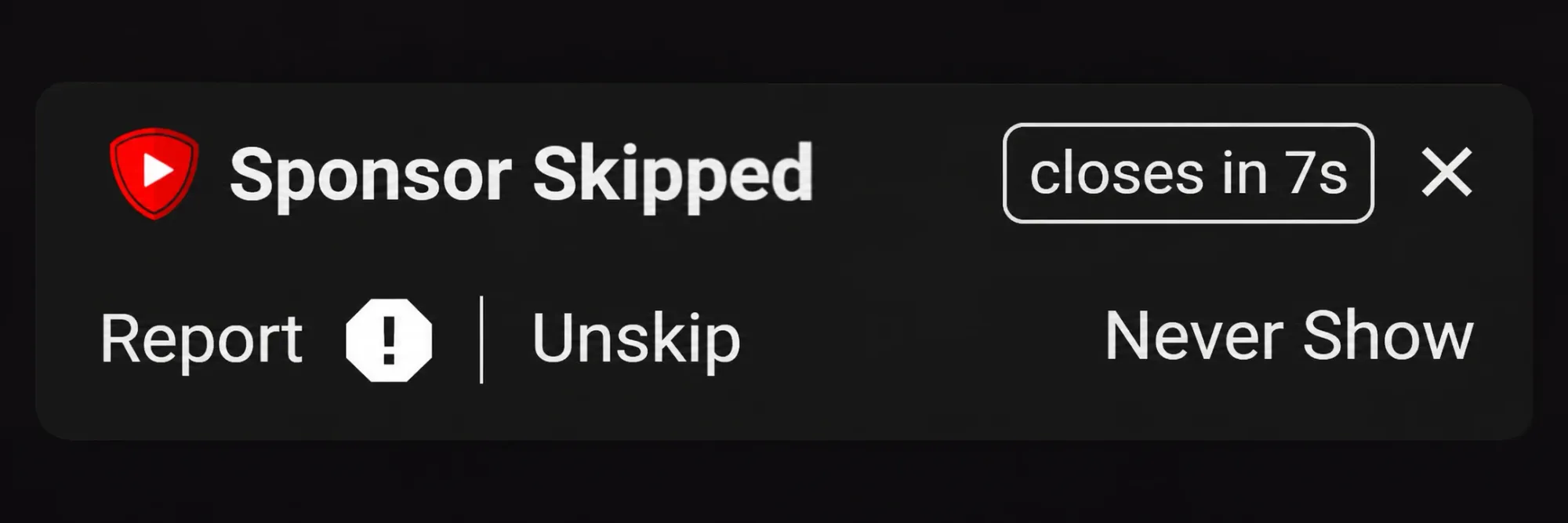
For a genuinely faulty segment, use the reporting or voting controls and choose the relevant reason. The official FAQ distinguishes incorrect timing from a wrong category. Category changes belong in the skip notice controls; the guidelines specifically distinguish that notice from the extension popup.
Submitted timestamps can't simply be edited in place. To correct timing, downvote the old segment and submit a properly bounded replacement. Changing the category is a separate action when the times are already correct. Keep the notice available while learning these controls; hiding it makes it harder to inspect a surprising jump.
Keep sponsorships on selected channels
For a channel you want to watch uninterrupted, use the popup on a video made by that channel and its channel-specific skip-profile controls. Configure an alternative profile with the behavior you want, add that channel to it, then confirm the association under Channel-specific settings in options. Current interface strings include For this channel and Add channel to skip profile; other interface text still refers to whitelisted channels.
Check a second video from the same channel after the change. If a segment at the very beginning still jumps, review Force channel check before skipping. The project's explanation says default skipping can begin before the channel ID is known. Waiting for that check prevents this race, with a possible delay before skipping. Channel whitelisting isn't supported on tv.youtube.com, according to the same interface documentation.
What published experience can tell you
A published background-playback test from October 2026 used SponsorBlock 6.1.7, Firefox 157.0 and Windows 10, with Sponsor and Non-Music set to automatic skipping. The reporter listened to one looped YouTube video in a background tab. The first loop skipped the tail after 5:21 and restarted at 0:24; the second played through that tail instead, about 10 minutes after leaving the tab. That second-loop failure occurred in 3 of 3 runs. Returning to the tab triggered the overdue skip.
The same reporter's shorter control—a 30-second video with its last 15 seconds marked locally—kept skipping during 5 minutes of background playback. Disabling Auto Tab Discard didn't resolve the longer-video failure. Other extensions remained installed, and a clean-profile attempt ran into separate playback errors, leaving the cause open. For a long background loop, I'd check that skipping continues after the first repeat. If it stops, bring the watch tab forward before treating valid timestamps as faulty submissions.
Recent Firefox reviews for version 6.1.7 contain enthusiastic reports of already-marked videos alongside complaints about submission warnings and access to community tools. These are qualitative accounts, not a measured coverage rate. One review's estimate that most videos were marked can't establish what you'll find on another channel or language.
A developer reply also distinguishes a human-written submission warning from an account ban and identifies sb.ltn.fi as a separately operated third-party site. A failure on that database browser doesn't establish that the extension's segment service is down. I'd use these reports to choose checks—category rules, service status and the exact failing surface—rather than average star ratings into a reliability score.
Submit a precise segment, or keep it local
Watch the section, mark its start and end with the player submission control or popup, choose the category and preview both transitions before submitting. Include a sponsor segue when appropriate, but preserve the surrounding explanation. The guidelines recommend frame-by-frame seeking with comma and period and exact video boundaries for a segment beginning or ending with the video.
If submission fails, read the error before retrying. The FAQ identifies zero-length segments as invalid and a 409 response as a duplicate you already submitted. Repeatedly sending the same interval won't repair it; inspect the existing segment and its category first.
Don't mark an entire sponsored product review for removal. If the product is the subject of the video, the sponsorship disclosure can be necessary context; the rules provide full-video labels instead. When useful visuals must remain while the audio fits a category, a mute segment can be appropriate.
If a section is valid content but you personally want to skip it, keep that preference local rather than downvoting it. For a purely personal skip, select the timestamps and close the editing box without pressing Submit. These segments stay locally. Shared submissions follow community rules; a private preference doesn't justify removing useful content for everyone.
The FAQ says local personal segments can be exported with your options. Export them before clearing extension storage or moving to another browser profile; a public database download is not a backup of your private local settings.
Playback lookup and submitting data are different
The privacy policy says playback lookup sends a prefix of the video ID's hash and receives candidate matches. Votes and submissions send additional identifiers and segment information, with hashed IP information used against spam. Optional anonymous skip-count reporting can be disabled in settings. The total time skipped is also counted locally.
This is a privacy-conscious lookup design, but it isn't a promise of no network requests or no data processing. The policy separately describes temporary salted IP hashes for user counting, Cloudflare's proxy logging and occasional connection-error logs. Keep the private user ID private; the public database identifier is different. Before moving profiles or reinstalling, save the settings and locally stored data you need.
When SponsorBlock doesn't skip
First distinguish an unmarked video from a disabled category. Inspect the popup for known segments, your active profile and channel exception. Then check that the extension is enabled in the browser profile you're using and has the access required for that YouTube page.
A November 2026 Safari report described segments appearing without automatic skips in Safari 27.2 on macOS 27.2.1 with SponsorBlock 6.1.7, even after the reporter updated from 6.1.5 and disabled wblock. Closing the long-running YouTube tab and opening a fresh one restored detection and skipping. That is one report, not a frequency or a confirmed cause; on Safari, I'd try a fresh watch tab before resetting settings or blaming valid timestamps.
If multiple marked videos stop working, consult the project's service status before resetting anything. Reload the watch page after an update, and distinguish an embedded player from the normal watch page. Keep settings before a reset: deleting local data won't create missing community timestamps. SponsorBlock is a good fit when you want control over repeated in-video interruptions and are willing to check unexpected skips.
